
Description
Integrate Salesforce with WordPress in Real Time for Bidirectional Data Exchange
Object Data Sync for Salesforce is a WordPress Salesforce Integration plugin that connects your WordPress site directly to your Salesforce and keeps selected data synchronized in real-time. When data changes in WordPress, such as users, posts, form submissions, or WooCommerce activity, the plugin sends those updates to Salesforce using secure APIs and configured object and field mappings.
When records are updated in Salesforce, a companion Salesforce AppExchange package sends those changes back to WordPress, where the plugin applies them automatically. This bidirectional synchronization reduces manual data entry and helps prevent outdated or inconsistent information across both platforms.
Our plugin offers the following benefits:
-
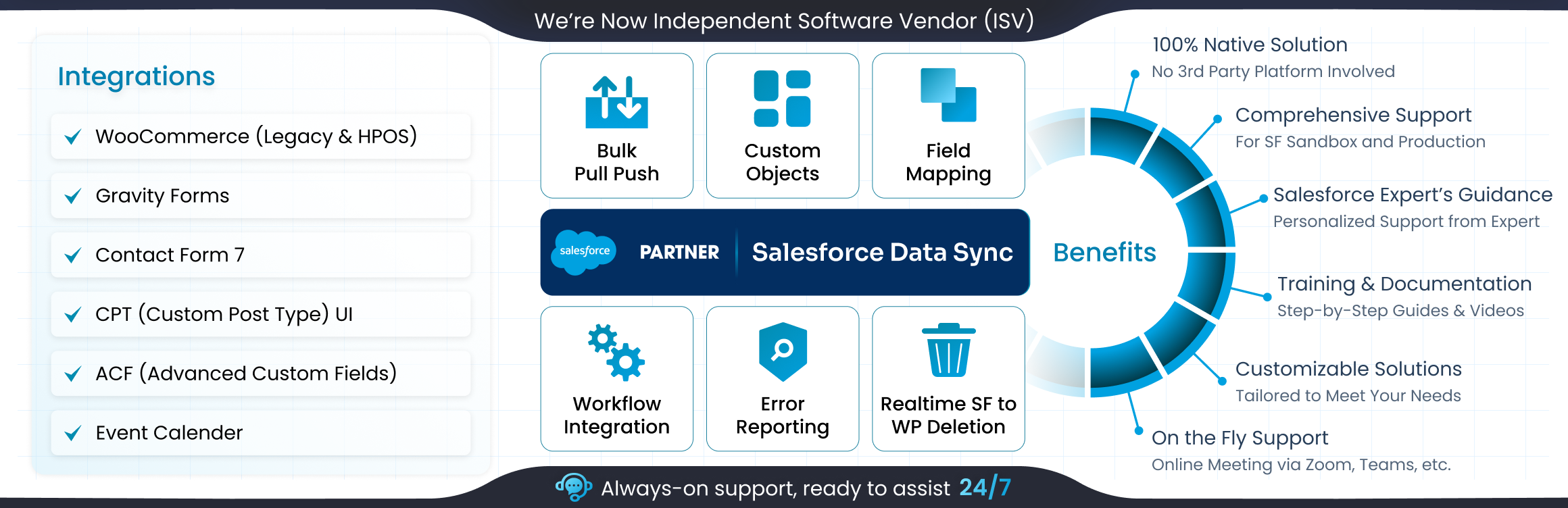
Official Salesforce ISV: Listed on the AppExchange and supported by the Salesforce partner ecosystem.
-
Flexible Plans: Free to install with core features. Advanced options are available through Standard, Premium, Enterprise, or VIP plans, suitable for startups and large organizations alike.
-
One Plugin for All Needs: Seamlessly connect Salesforce CRM with WooCommerce Sync, Gravity Forms, Contact Form 7, WPForms, Ninja Forms, Formidable Forms, Ultimate Member, Paid Memberships Pro, ACF, BuddyPress, MemberPress, BuddyBoss, and more in one place.
-
Enterprise Support: 24/7 assistance for onboarding, configuration, complex mappings, and high-volume transfers.
-
Secure Data Handling: Syncs directly into WordPress tables and communicates securely with your Salesforce instance. No external servers are involved.
Quick Access Resources: Official Website | Key Features | Pricing Plans | Book a Free Demo | Setup Guide | Developer Documentation | WooCommerce Salesforce Integration | Contact Us
Step‑By‑Step Video Guide: Configure WordPress Salesforce Integration Plugin
Need Help or Support?
If you face issues with the miniOrange Salesforce Integration plugin, need advice on mapping objects, or want to discuss a custom requirement, contact us at salesforcesupport@xecurify.com.
Core Features of the Salesforce Sync Plugin
Our WordPress plugin offers many features you can use for quick Salesforce Integration:
-
Real-Time Bidirectional Sync
Automatically create/update/delete Salesforce objects when data changes in WordPress, and vice versa. -
Multiple Object Mapping
Map Salesforce objects like Leads, Accounts, Contacts, Opportunities, Products to WordPress entities like WooCommerce orders, users, or custom post types. Run multiple mappings at once without limits. -
Custom Triggers
Define rules for when data moves between systems. For example, send WooCommerce orders to Salesforce only when they reach statuses like completed or refunded. -
Custom Field Mapping
Sync both standard and custom fields, including Advanced Custom Fields (ACF). Perfect for unique data such as membership IDs, loyalty levels, or service preferences. -
One‑Time Pull and Push
Easily migrate existing data by pulling Salesforce records into WordPress or pushing large datasets from WordPress into Salesforce. Useful for onboarding or platform migrations. -
Secondary Key Lookup
Prevent duplicates by using alternate identifiers like email addresses or customer IDs instead of Salesforce record IDs. -
Taxonomy Assignment
Sync and assign categories, tags, and labels from Salesforce directly into WordPress, keeping content structured and consistent. -
Multi‑Attachment Handling
Sync multiple file attachments from WordPress forms into Salesforce, storing them with the right Contact, Lead, or Opportunity as Related records. -
Image Updates
Keep WooCommerce product images in sync with those managed in Salesforce, ensuring catalogs stay accurate. -
Event Management
Push WordPress Events Calendar entries into Salesforce as Campaigns or custom event objects, where registrations automatically convert into Leads or Contacts for improved tracking. You can easily pull upcoming events data from Salesforce directly within WordPress. -
Real‑Time and Scheduled Deletion
When records are deleted in one system, they are removed in the other, and vice versa. Bulk deletions can also be scheduled. -
Filtered Syncs
Apply conditions to control which Salesforce records are synced into WordPress, whether in real time or during bulk pulls. -
Data Display in WordPress
Show Salesforce data directly in WordPress using list or card layouts, giving editors and support teams visibility without switching platforms.
Supported Salesforce 🔁 WordPress Integrations
The Salesforce WordPress Integration plugin connects effortlessly with widely used WordPress plugins such as:
-
WooCommerce
The WooCommerce Salesforce Integration syncs orders, subscriptions, payments, refunds, products, and customer details in real time. Inventory stays consistent in both systems. -
ACF (Advanced Custom Fields)
Custom fields data captured in WordPress is mapped directly into Salesforce with our ACF Salesforce Integration. Unique custom data, such as venue details, order metadata, or service preferences, remains synced. -
CPT UI
Structured content like Speaker catalogs, directories, or any Custom Post Type created with CPT UI can be mapped to Salesforce objects for record management. -
Event Calendar
Events, tickets, and attendees are kept synced between WordPress and Salesforce. You can keep titles, dates, locations, organizers, and categories updated across both platforms for better event management. -
Gravity Forms
Submissions from Gravity Forms are captured in Salesforce as Leads, Contacts, or Cases through the Salesforce Gravity Forms integration. Files such as resumes or invoices captured in submissions are synced within the right records related to Leads, etc. -
WPForms
The WPForms Salesforce Integration moves submissions into Salesforce instantly. Records are created or updated automatically, and uploaded files stay linked to the correct contact. -
Ninja Forms
Entries from Ninja Forms are sent to Salesforce. A secondary key lookup ensures existing Contacts or Accounts are updated instead of duplicated. -
Contact Form 7
With Contact Form 7 Salesforce Integration, submissions generate Leads or Cases in real time, supporting sales and support teams. -
MemberPress
Membership registrations, levels, payments, renewals, and cancellations are synced with Salesforce, keeping member data consistent. -
Ultimate Member
Registrations, role changes, and profile updates are synced through the Ultimate Member Salesforce Integration. Salesforce can also update WordPress roles when required. -
Paid Memberships Pro
Renewals, upgrades, and cancellations are tracked in Salesforce via the Paid Memberships Pro Integration, ensuring subscription data is accurate. -
LearnDash
Enrollments, course progress, and completions are recorded in Salesforce through the LearnDash Integration, giving teams visibility into learner performance. -
BuddyPress
Community features such as profiles, groups, and activity streams are synced into Salesforce, allowing engagement data to be analyzed with CRM records. -
BuddyBoss
The BuddyBoss Salesforce Integration keeps communities connected. Roles, profiles, and activity updates in Salesforce can also adjust BuddyBoss workflows.
Business Use Cases Supported By Our Salesforce Integration Plugin
Our Object Data Sync for Salesforce WordPress Integration helps businesses keep data consistent and up to date across platforms. Here are the most common ways teams use it:
-
WooCommerce: Orders, Products, Customers, and Images
Running an online store means every order, product update, and customer detail needs to be visible in Salesforce without delay. The WooCommerce Salesforce Integration makes this automatic. Orders, subscriptions, and renewals appear in Salesforce, products map to Product objects, customer profiles become Contacts or Accounts, and product images stored in Salesforce update WooCommerce listings. Your catalog, sales data, and customer records stay accurate in both systems.
Watch WooCommerce Salesforce Sync in Real Time
-
Custom Content: CPT and ACF
Businesses often rely on structured content like catalogs or directories in WordPress. With ACF Salesforce Integration and CPT UI Salesforce Integration, custom post types and their custom fields map directly to Salesforce objects. Updates move both ways, so Salesforce always reflects the latest structured data. This prevents duplication and keeps specialized content reliable.
See How to Map Custom Posts
-
Events: Registrations and Attendance
Events generate valuable leads, but tracking them only in WordPress leaves Salesforce reporting incomplete. With our integration, events flow into Salesforce as Campaigns or custom objects. Registrations create Leads or Contacts, cancellations update records immediately, and campaign dashboards combine event and sales data for accurate ROI tracking. -
Memberships: Subscriptions and Renewals
Subscription businesses need consistent records. The Salesforce WordPress Integration ensures new registrations create Contacts, payment histories sync automatically, and subscription details update in real time. Membership levels stored in Salesforce can also assign WordPress roles, keeping member profiles consistent across both systems. -
Lead Capture: WordPress Forms
Forms often collect leads, demo requests, or support cases. With Gravity Forms Salesforce Integration, plus support for WPForms, Ninja Forms, and Contact Form 7, submissions flow into Salesforce instantly. Leads, Contacts, or Cases are created with mapped fields and files, while duplicate prevention keeps data clean. -
Communities: BuddyPress and BuddyBoss
Communities generate engagement data that becomes more powerful when connected to Salesforce. Through BuddyPress and BuddyBoss Salesforce Integration, profiles, group memberships, and activity logs move into Salesforce automatically. Roles in WordPress can be assigned based on Salesforce attributes, and profile updates, such as location or preferences, stay synced. -
VIP Support
For enterprises that need more than basic integration, the Salesforce plugin VIP Package offers advanced features, priority support, and tailored solutions. It ensures operations remain secure, scalable, and efficient.
Feedback and Support
Your experience matters. Whether you have feedback, need assistance, or face challenges with Salesforce WordPress Integration, our expert team is ready to help. Contact us at salesforcesupport@xecurify.com.
Screenshots
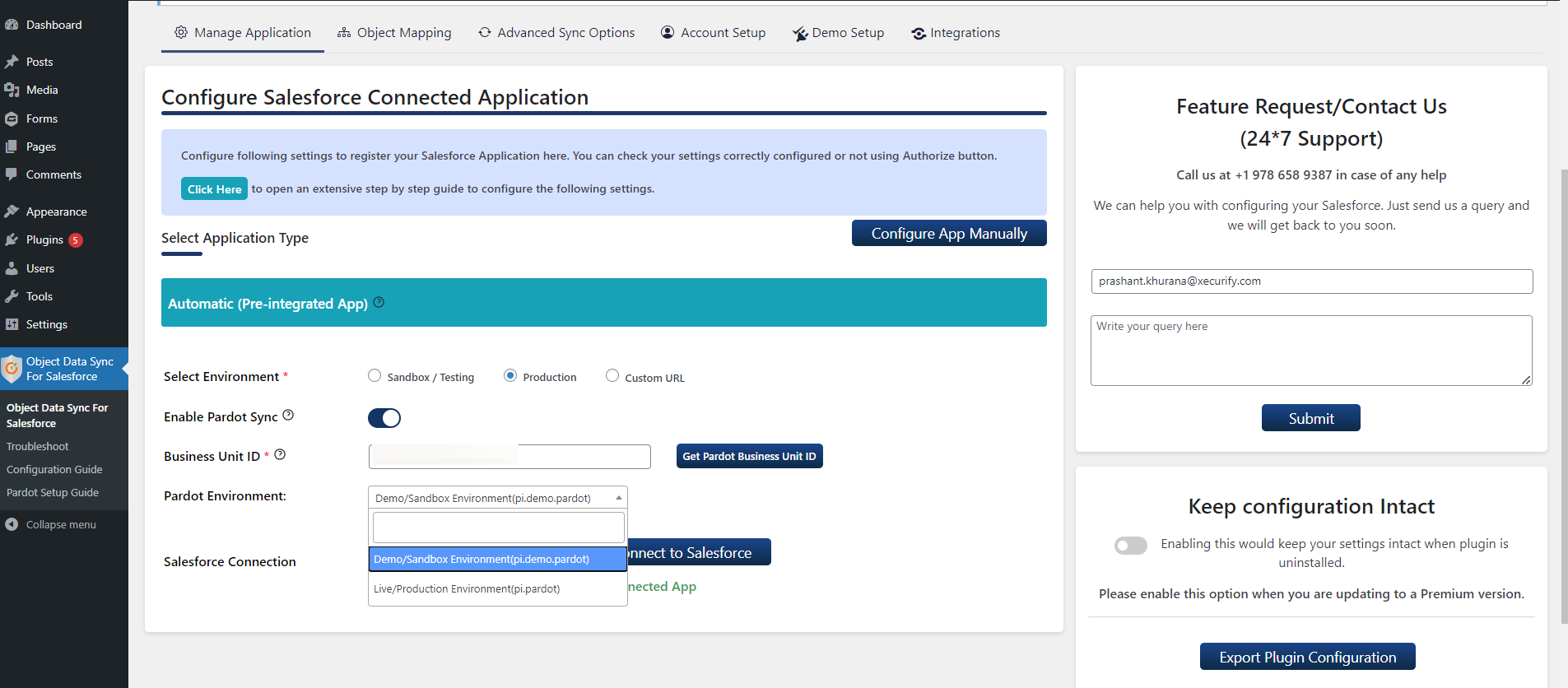
App Integration Types 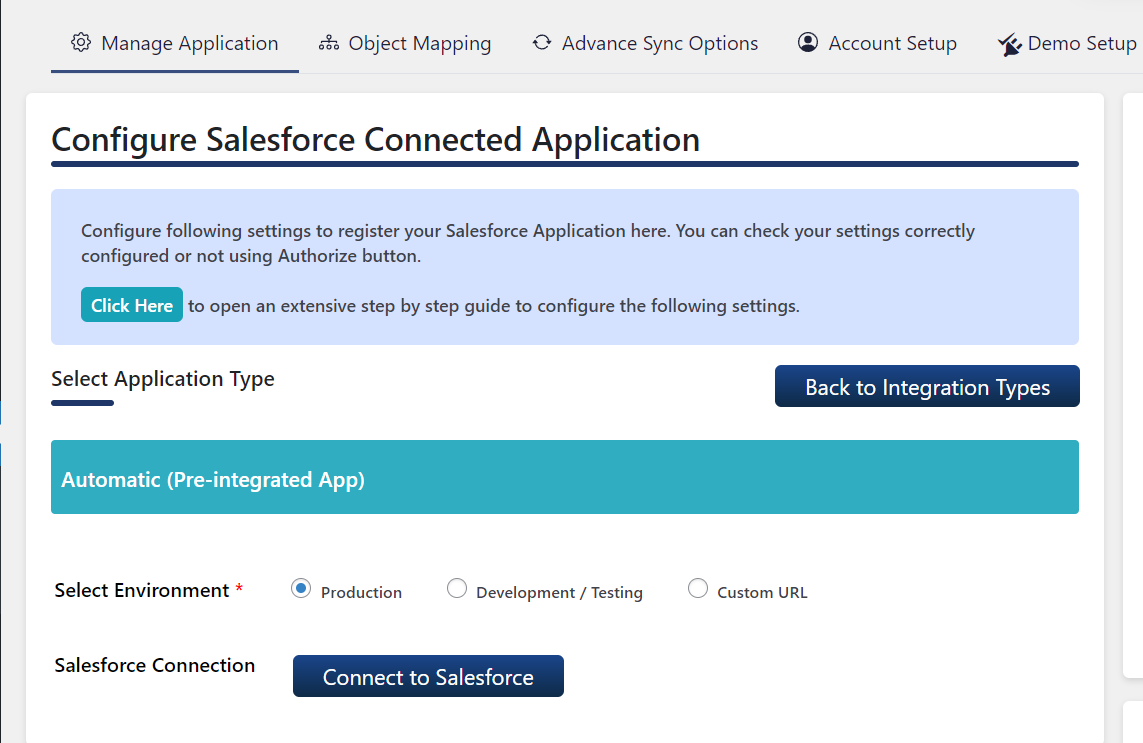
Pre-Integrated App Configuration 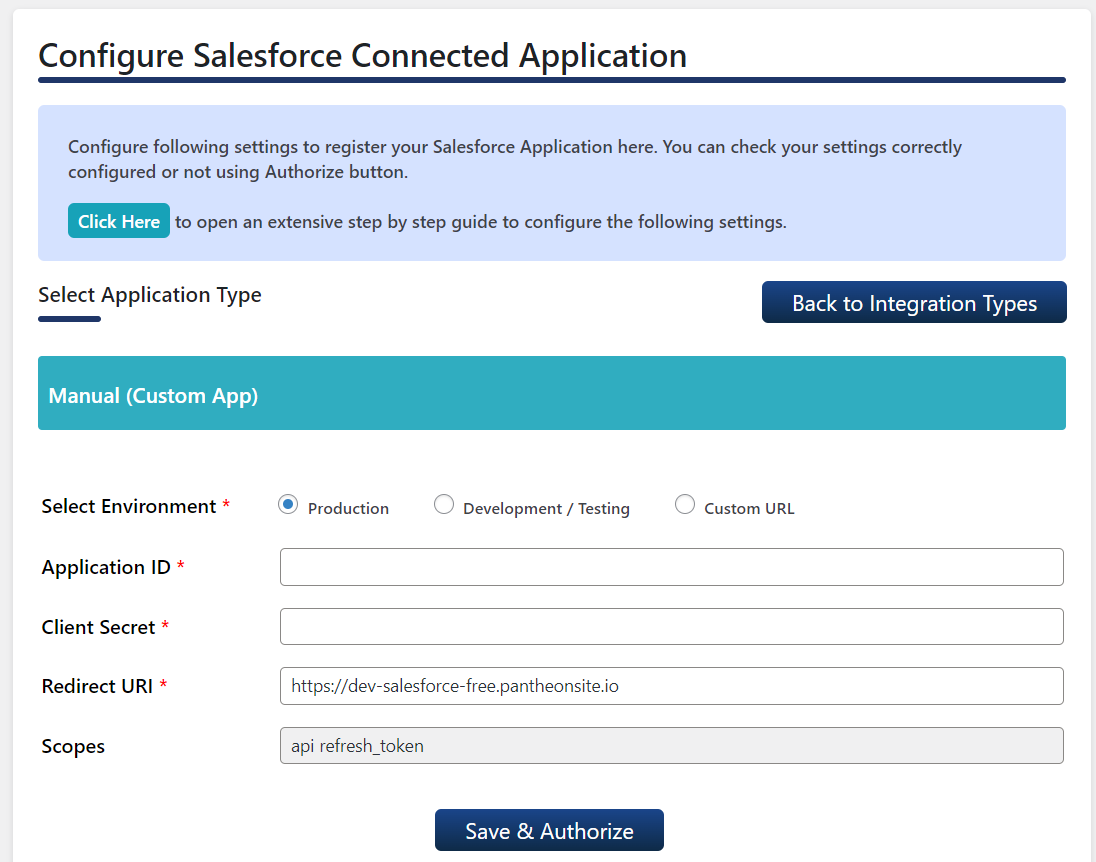
Manual (Custom App) Configuration 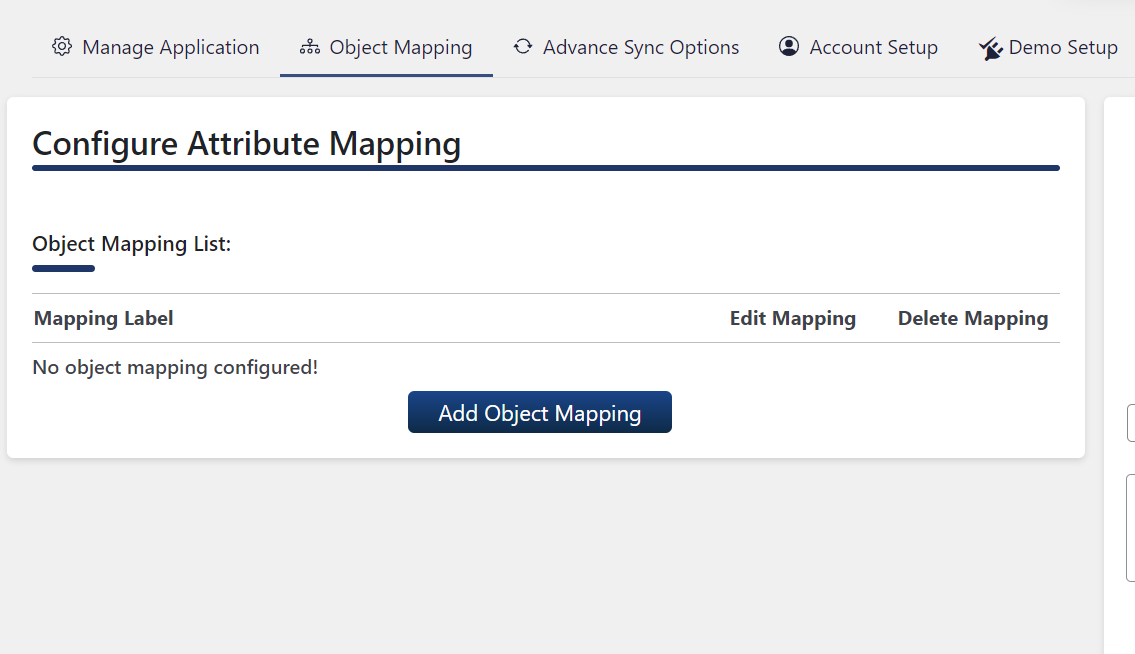
Field Mapping List 
Object Mapping for Leads 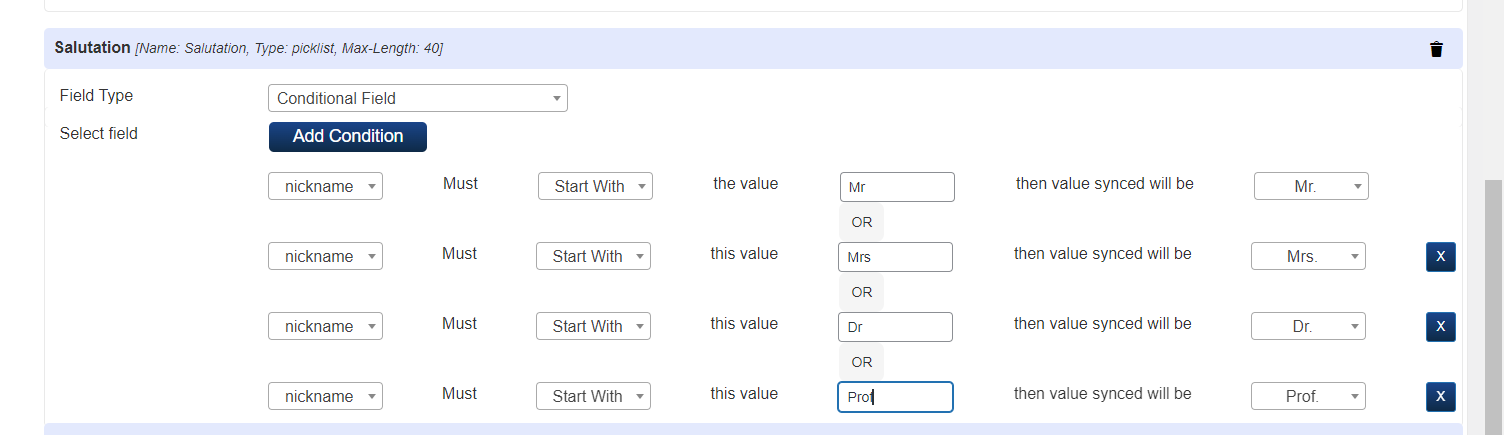
Installation
From WordPress.org
- Download miniOrange
Object Data Sync for Salesforceplugin. - Unzip and upload the
Object Data Sync for Salesforcedirectory to your/wp-content/plugins/directory. - Activate
Object Data Sync for Salesforcefrom your Plugins page.
From your WordPress dashboard
- Visit
Plugins > Add New. - Search for
Object Data Sync for Salesforce. Find and InstallObject Data Sync for Salesforce. - Activate the plugin from your Plugins page.
From your Salesforce App
- Go to the Salesforce login page and log in as an Administrator.
- You will be represented with the home screen of Salesforce.
- Navigate to Apps in the left menu, then select the App Manager option.
- In the same tab, select the option New Connected App to create a new application.
- Fill in the required information in the below boxes.
- Under the API (Enable OAuth Settings) tab, check the option of Enable OAuth Settings.
- Enter your WordPress URL in the Callback URL block. Note: Make sure that the URL must be present in https:// format.
- Under the available OAuth scopes users have to select Manage user data via APIs (API) and Perform requests on your behalf at any time (refresh_token, offline_access) options then click on SAVE.
- Now the user will be prompted with a confirmation page, click on Continue.
- After this users will be able to view the app they configured, keep the Consumer Key and Consumer Secret handy you will need them while configuring the plugin.
From Object Data Sync for Salesforce plugin
- Copy the Consumer Key and Consumer Secret from Salesforce App. Navigate to the plugin and under the Basic App Configuration tab paste it.
- Click on Save and Authorize.
- In the Field Mapping tab, select the Salesforce object where you want your WordPress record to be shown.
- From the dropdown select the attribute you want as Username and Email. You can set more attributes and click on SAVE.
- Navigate back to the Manage Application tab, under the Test Connection tab from the dropdown select the user you want to push to the Salesforce and click on PUSH. The user will be created in the Salesforce object you chose. If the user already exists, it will get updated.
- Navigate to Salesforce, under the Object Manager tab search for the Salesforce object you choose, and click on the object.
- Now to view the record from WordPress into the Salesforce object you have to switch the display to Salesforce Classic mode.
- Now you can now view your record into the Salesforce object you chose.
FAQ
-
Can I synchronize my WooCommerce orders with Salesforce?
-
Yes. The Object Data Sync plugin connects WooCommerce with Salesforce so orders, products, customer details, subscriptions, payments, and refunds stay in sync through a reliable WooCommerce integration.
-
Can I manage quotes in WordPress and sync them to Salesforce?
-
Yes. You can create and manage quotes in WordPress. Once approved, they are sent to Salesforce and marked as accepted, keeping records consistent across both platforms.
-
What is the best WordPress Salesforce integration plugin?
-
There are several options, but Object Data Sync for Salesforce Integration is built specifically for WordPress. It offers broad integration support and 24/7 assistance. A free demo is available so you can test features before committing.
-
Where can I download the plugin?
-
You can get the free version from the WordPress plugin directory. For advanced features and pricing, you can visit our website.
-
Can I map custom form fields to Salesforce objects?
-
Yes. The plugin supports custom field mapping, so submissions are correctly synced to Salesforce objects, whether standard or custom.
-
Can I sync only specific Salesforce records to WordPress?
-
Yes. The Enterprise version includes advanced filters based on Salesforce field values. This lets you bring only the records you need to WordPress.
-
Can I try Enterprise features before purchasing?
-
Yes. A 7‑day trial is available. You can test integrations such as Gravity Forms Salesforce, WPForms Salesforce, and WooCommerce Salesforce in your setup.
-
Can I send Gravity Forms data to Salesforce?
-
Yes. Our Salesforce plugin for WordPress allows you to map form fields and send data directly from Gravity Forms to Salesforce in real time.
-
Can I use Contact Form 7 with Salesforce?
-
Yes. The Contact Form 7 Salesforce Integration creates or updates records in Salesforce automatically based on form submissions.
-
Can I integrate Ninja Forms with Salesforce?
-
Yes. The Ninja Forms Salesforce Integration sends submissions directly to Salesforce for lead management or other workflows.
-
How does WPForms work with Salesforce?
-
With WPForms Salesforce Integration, form fields map to Salesforce objects. Leads, Contacts, and updates are created automatically, streamlining workflows.
-
Where can I get help if I have questions?
-
For guidance or support, contact us at salesforcesupport@xecurify.com. Our team will be happy to walk you through how Object Data Sync for Salesforce Integration works and ensure it meets your WordPress and Salesforce Integration needs.
Reviews


Contributors & Developers
“Object Data Sync for Salesforce Integration with WP, Woo, Gravity, WPForms, Ninja, CF7 & more” is open source software. The following people have contributed to this plugin.
Contributors

Interested in development?
Browse the code, check out the SVN repository, or subscribe to the development log by RSS.
Changelog
1.3.6
- Support Form UI Improved.
1.3.5
- Added Compatibility with WordPress 6.9.
- Minor Security Improvements.
1.3.4
- Minor bug fixes.
1.3.3
- Addressed minor bugs.
- Implemented security improvements.
1.3.2
- Renamed the Integration tab to Supported Integrations, and the UI has been revamped.
1.3.1
- Minor bug fixes.
1.3.0
- Added support for Salesforce Multipicklist Field Type sync in Object Mapping.
- Improved Import/Export Configuration UI.
- Minor bug fixes.
1.2.9
- UI improvements.
- Improved field mapping logic.
- Added support for Salesforce Picklist Type fields, including sync to WordPress fields ( for Salesforce to WordPress direction).
- Included link to the Salesforce AppExchange package for easy installation.
- Added Compatibility with WordPress 6.8.
1.2.8
- Optimzed the Salesforce to WordPress realtime sync flow.
1.2.7
- Made fixes to the Pardot Integration.
1.2.6
- Updated Pricing Plan.
- Bug Fixes in the plugin deactivation flow.
For older changelog entries, please see the [additional changelog.txt file] (https://plugins.svn.wordpress.org/object-data-sync-for-salesforce/trunk/changelog.txt) provided with the plugin.