
Description
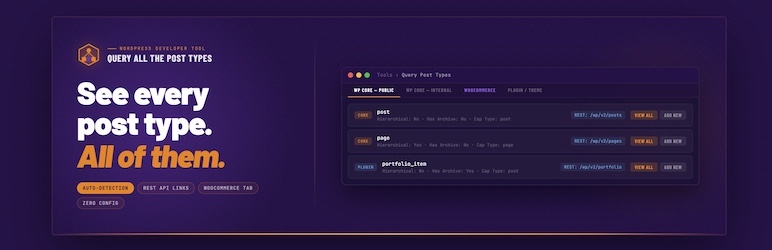
Query All The Post Types is a lightweight developer tool that auto-detects every registered post type on your WordPress site and displays comprehensive information about each one.
Post types are automatically grouped by origin. No configuration required.
WooCommerce store owners: All your WooCommerce post types (products, orders, coupons, subscriptions, etc.) are grouped in a dedicated purple WooCommerce tab for easy access.
Developers and AI users: As of version 2.1, QATP registers every post type as a discoverable entry in the WordPress Abilities API (WordPress 6.9+). Any authenticated tool such as an MCP client, an AI assistant, or a custom admin dashboard can query your site and get a complete, structured inventory of every post type, what it supports, and how it’s configured.
Features
- Auto-Detection — Discovers all post types registered by WordPress core, plugins, and themes
- Tabbed Interface — Post types organized into logical groups for easy navigation
- Comprehensive Data — View all registration settings, REST API config, supports, taxonomies, and labels
- REST API Links — Clickable endpoint URLs for post types exposed to the REST API
- WooCommerce Tab — Dedicated purple tab groups all your WooCommerce post types (products, orders, coupons, and more)
- Quick Actions — View All and Add New buttons for post types with admin UI
- WordPress Abilities API — Every post type registered as a machine-readable ability (WordPress 6.9+)
Post Type Groups
- WordPress Core — Public — Built-in types with a UI (post, page, attachment)
- WordPress Core — Internal — Built-in types without a UI (revision, nav_menu_item, wp_template, etc.)
- WooCommerce — Products, orders, coupons, subscriptions, and more (when active)
- Advanced Custom Fields / ACF Pro — Field groups, post types, taxonomies, and options pages (when active)
- Elementor — Elementor library, floating buttons, and component types (when active)
- LearnDash — Courses, lessons, topics, quizzes, assignments, and more (when active)
- BuddyPress — Groups, member types, and email types (when active)
- GiveWP — Donation forms and payment types (when active)
- Easy Digital Downloads — Downloads and EDD-registered types (when active)
- AppPresser — Push notification and log types (when active)
- Plugin/Theme — Public — Custom post types from any other plugin or theme, with a public UI
- Plugin/Theme — Internal — Custom post types from any other plugin or theme, without a public UI
Data Displayed Per Post Type
- Slug, description, and all boolean settings
- Public, publicly queryable, show UI, show in nav menus, show in admin bar
- REST API: show in REST, REST base, REST namespace, REST controller class
- Has archive, exclude from search, capability type, map meta cap
- Hierarchical, rewrite rules, query var, menu position, menu icon
- Can export, delete with user
- Supported features (title, editor, thumbnail, excerpt, comments, etc.)
- Associated taxonomies with admin links
- All registered labels (expandable section)
- REST API endpoint URL (clickable)
WordPress Abilities API
Starting in version 2.1, QATP registers every post type as a WordPress Ability: a machine-readable declaration that authenticated tools can query via the REST API.
This feature requires WordPress 6.9 or later. On older versions, QATP continues to work normally and the Abilities API integration is silently skipped.
What gets registered
Each post type is registered as an ability under the qatp/ namespace. For example, qatp/post, qatp/product, qatp/page. Abilities are grouped into categories matching the tabs you see in the admin UI: qatp-core-public, qatp-core-internal, qatp-woocommerce, and so on.
Running an ability returns a structured data object for that post type:
slug— the registered post type namelabel— plural label (e.g. “Posts”)singular— singular label (e.g. “Post”)public,show_ui,show_in_rest,hierarchical— boolean flagsrest_base— the REST API base URL segmentsupports— array of supported features (title, editor, thumbnail, etc.)taxonomies— array of associated taxonomy slugs
Who can access it
Access requires the manage_options capability. Such as site administrators only. This is intentional. Post type registration data can reveal details about your site’s plugin stack and data architecture. It is not exposed publicly.
How to browse it
In your browser (easiest):
Go to Tools Query Post Types in your WordPress admin. The sidebar shows a Browse Abilities API button. Click it and it opens the endpoint in a new tab with authentication already handled. Install a JSON Formatter browser extension (available for Chrome and Firefox) to make the output readable.
Note: visiting the endpoint URL directly in your browser without the button will return a 401 error. The WordPress REST API requires a nonce for cookie-authenticated requests. The button generates one for you automatically.
With WP-CLI:
See all QATP abilities and their descriptions:
wp --url=https://yoursite.com eval 'wp_set_current_user(1); $r = rest_do_request(new WP_REST_Request("GET", "/wp-abilities/v1/abilities")); $qatp = array_filter($r->get_data(), fn($a) => strpos($a["name"], "qatp/") === 0); foreach ($qatp as $a) { echo $a["name"] . "\n " . $a["label"] . " — " . $a["description"] . "\n"; }'
Run a specific ability to get full structured data:
wp --url=https://yoursite.com eval 'wp_set_current_user(1); $r = rest_do_request(new WP_REST_Request("GET", "/wp-abilities/v1/abilities/qatp/post/run")); echo json_encode($r->get_data(), JSON_PRETTY_PRINT);'
With Postman or any REST client:
Create an Application Password in your WordPress admin under Users Your Profile Application Passwords. Use HTTP Basic Auth with your username and the generated password. Send a GET request to https://yoursite.com/wp-json/wp-abilities/v1/abilities.
Screenshots
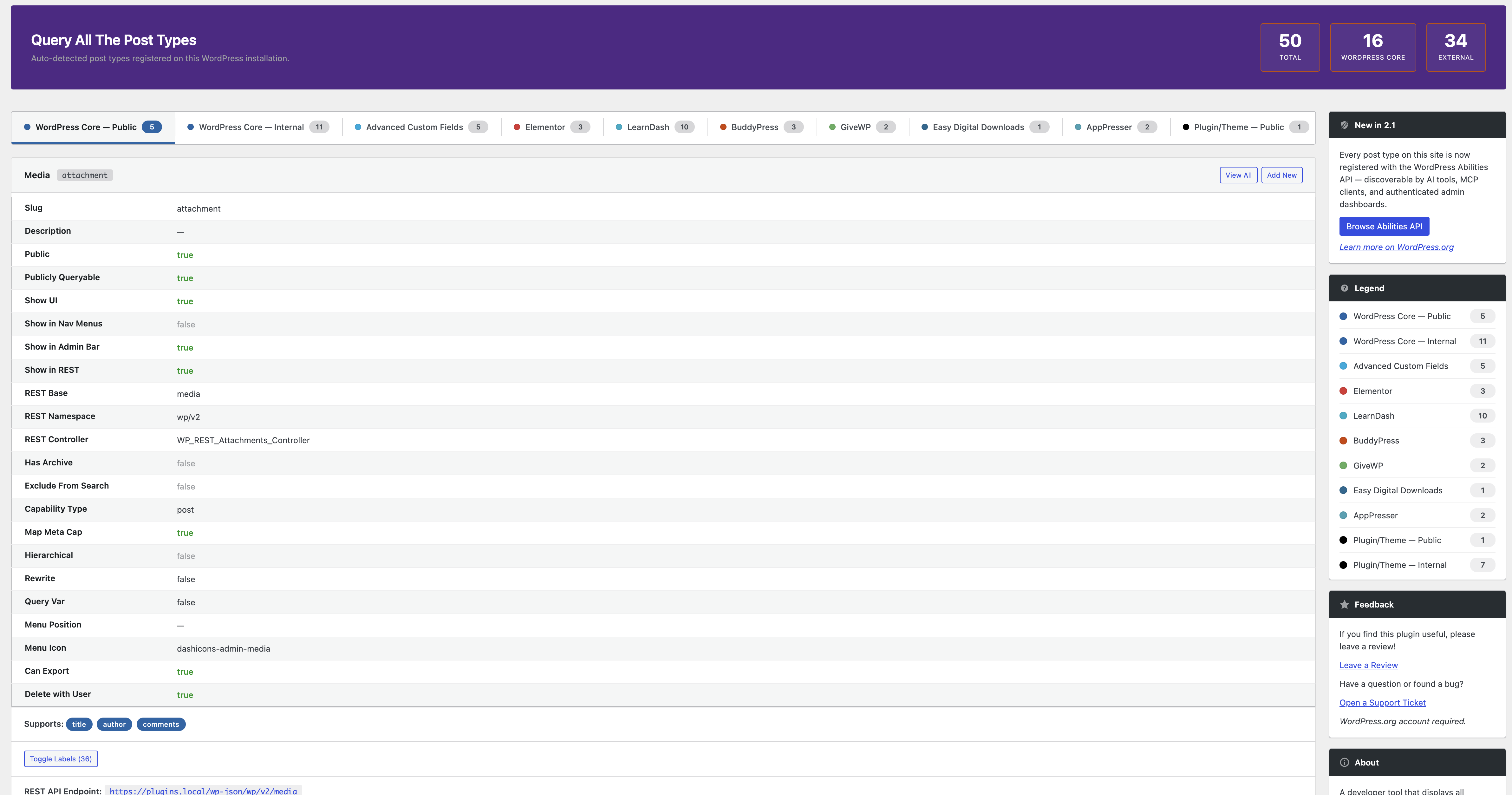
Main interface showing post types grouped into tabs 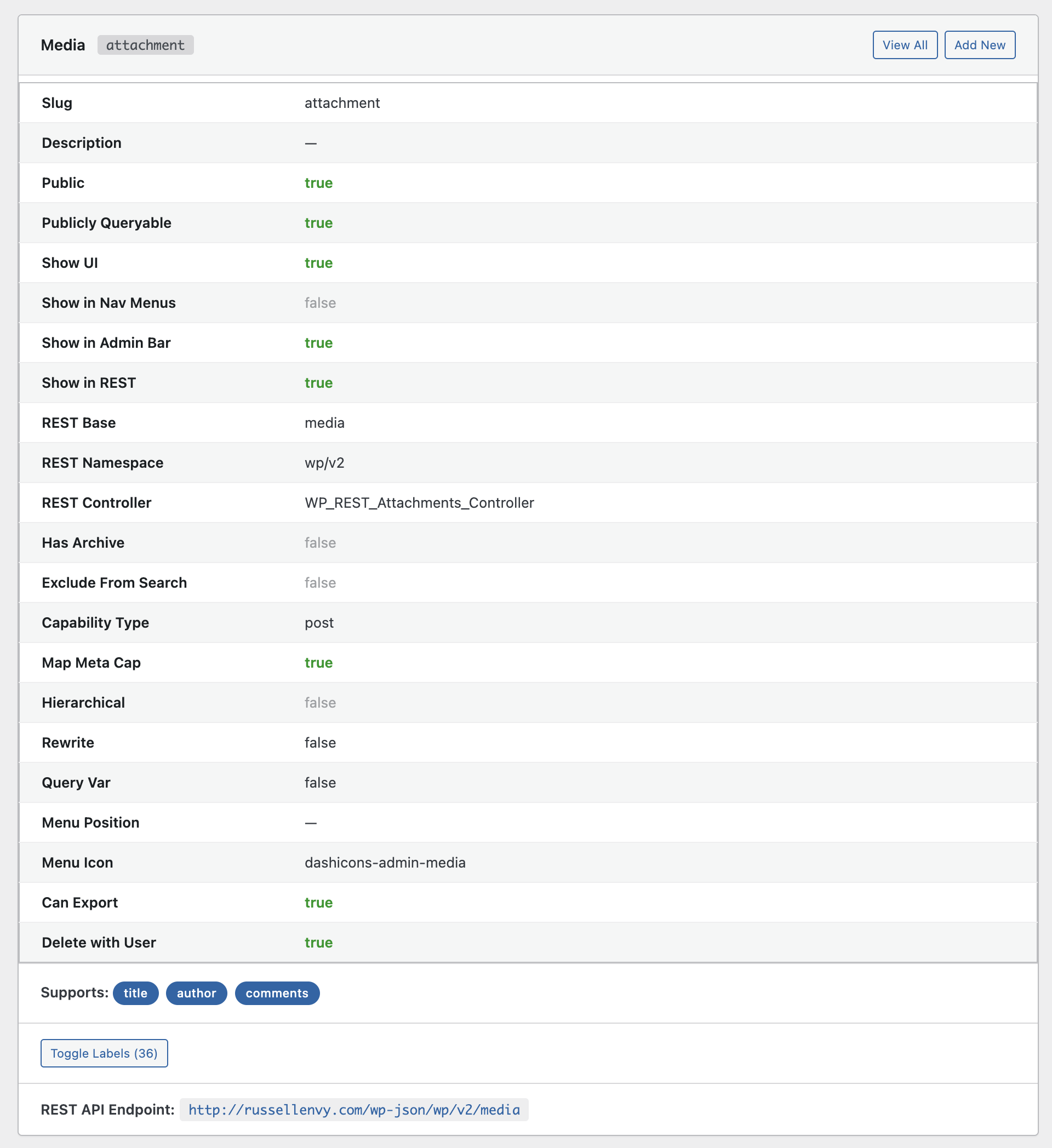
Post type card with settings, supports, and taxonomies 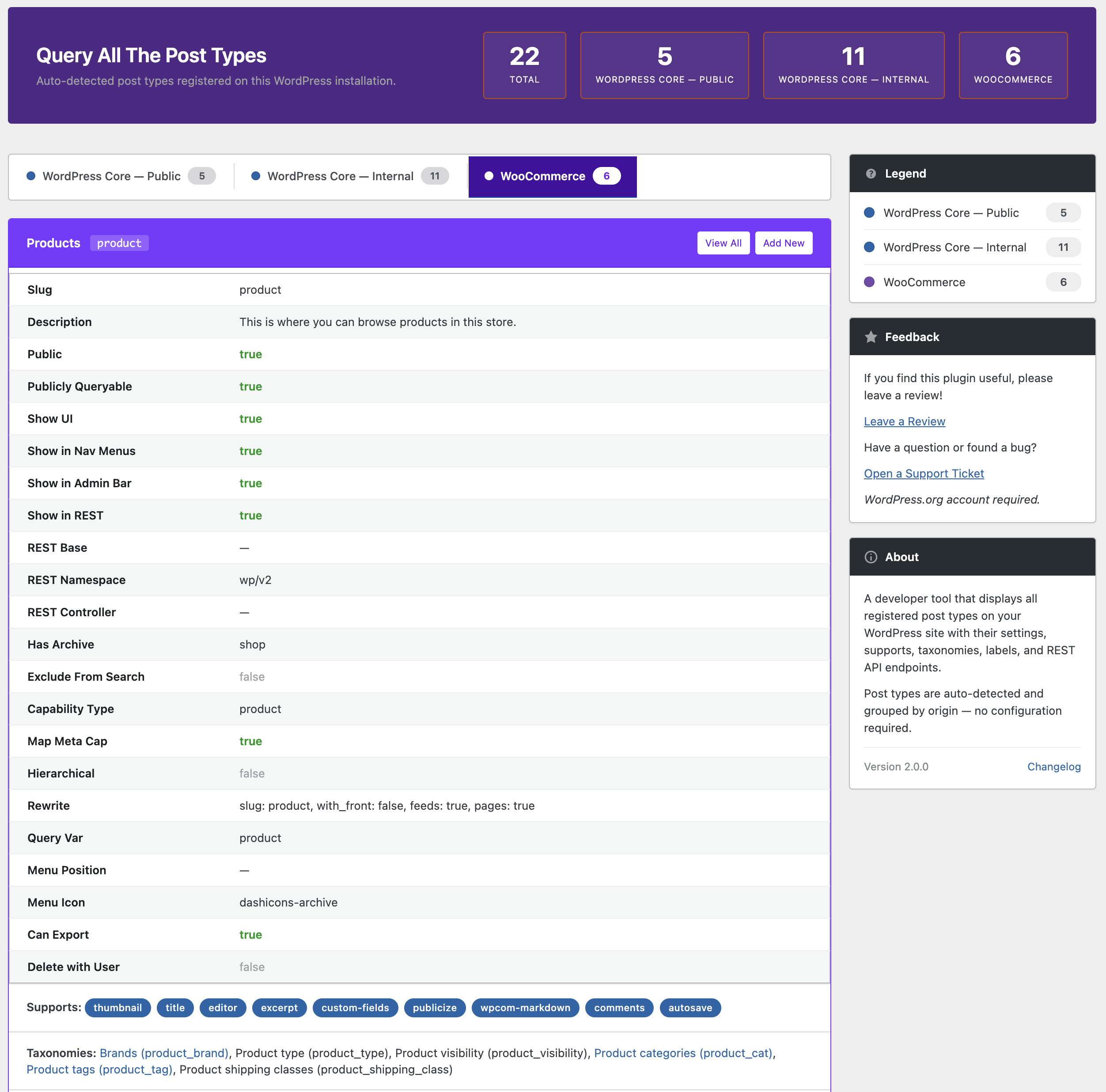
WooCommerce tab with purple-branded styling 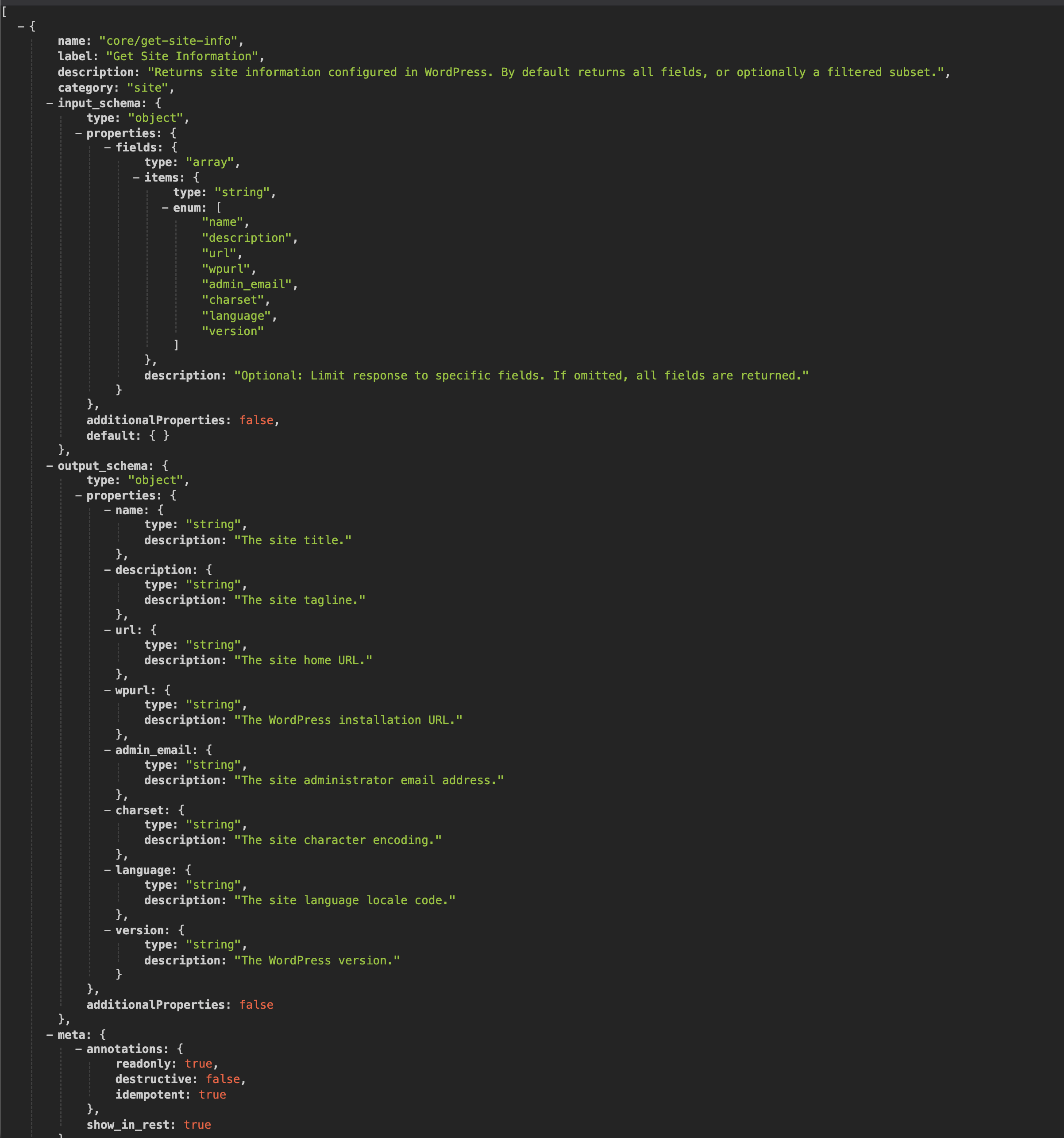
WP Abilities API Endpoint Example
Installation
- Upload the
query-all-the-post-typesfolder to/wp-content/plugins/ - Activate the plugin through the Plugins menu
- Navigate to Tools > Query Post Types
FAQ
-
How does the plugin detect post types?
-
It uses the WordPress core function
get_post_types()to retrieve all registered post types at runtime. Nothing is hardcoded. Any post type registered by any plugin, theme, or WordPress core will appear automatically. -
Where do I find the plugin page?
-
Go to Tools > Query Post Types in your WordPress admin dashboard.
-
I updated and can’t find the plugin anymore!
-
In version 2.0, the plugin moved from its own top-level admin menu to the Tools menu. Look for Tools > Query Post Types.
-
These buttons only appear for post types that have
show_uiset totrue. Internal post types without an admin interface won’t have these action buttons. -
Where are my WooCommerce post types?
-
Look for the purple WooCommerce tab! All WooCommerce-related post types (products, orders, coupons, subscriptions, etc.) are grouped there for easy access. The tab only appears when WooCommerce is active.
-
Can I use this on a production site?
-
Yes. The plugin is read-only and doesn’t modify any data. It only displays information about registered post types.
-
Does this plugin work with multisite?
-
Yes. Each site in a multisite network will display its own registered post types.
-
What is the WordPress Abilities API?
-
The Abilities API is a new feature introduced in WordPress 6.9 that lets plugins register machine-readable declarations about what a site can do. QATP uses it to expose your post type architecture to AI tools, MCP clients, and authenticated admin dashboards without any additional configuration.
-
Do I need WordPress 6.9 for the Abilities API feature?
-
Yes. The Abilities API integration requires WordPress 6.9 or later. On earlier versions, everything else in QATP works normally. The Abilities API registration is silently skipped.
-
Is the Abilities API data public?
-
No. The endpoint requires administrator-level authentication (
manage_options). Anyone who requests the URL without being logged in as an admin will receive a 403 error. This is by design — post type data can reveal details about your site’s plugin stack.
Reviews


Contributors & Developers
“Query All The Post Types” is open source software. The following people have contributed to this plugin.
Contributors
Translate “Query All The Post Types” into your language.
Interested in development?
Browse the code, check out the SVN repository, or subscribe to the development log by RSS.
Changelog
2.1.0
- New: WordPress Abilities API integration (requires WordPress 6.9+) every post type on your site is now registered as a machine-readable ability
- New: Abilities grouped by origin. Core Public, Core Internal, WooCommerce, and plugin-specific categories
- New: Each ability exposes slug, labels, boolean flags, REST base, supported features, and associated taxonomies
- New: AppPresser ecosystem tab. AppPresser post types grouped automatically when the plugin is active
- New: Developer-facing label when a post type is registered without a singular name
- Improved: Post type classifier is instantiated once per request (performance)
- Requires WordPress 6.9+ for Abilities API; all other features work on WordPress 5.0+
2.0.1
- Accessibility: Added aria-hidden to decorative sidebar icons
- Accessibility: Settings tables now use proper th scope=”row” for screen readers
- Accessibility: Added prefers-reduced-motion support for users who prefer reduced animations
- Tested up to WordPress 6.9
2.0.0
- Breaking: Plugin page moved to Tools > Query Post Types (was its own top-level menu)
- Complete rewrite with modern OOP architecture
- New tabbed interface for better organization
- Auto-detection of all post types (zero hardcoded slugs)
- Intelligent grouping based on _builtin, public, and show_ui properties
- WooCommerce ecosystem tab with custom styling (when WooCommerce is active)
- Comprehensive settings display for each post type
- REST API endpoint links
- Feature support badges
- Taxonomy links to admin pages
- Expandable labels section
- Page header with post type statistics
- Sidebar with about info and legend
- Responsive card-based layout
- WordPress 5.7 admin color palette
- All output properly escaped per WordPress coding standards
1.9.4
- Tested with WP 5.0
1.9.3
- Added post type counter details
1.9.2
- Fixed SVN sync issues from 1.9.1
1.9.1
- Fixed changelog link in admin panel
- Fixed unlinked taxonomies in newer WooCommerce versions
- Fixed taxonomies not showing for hierarchical post types
- Added link to custom post type register page
- Added active post type count display
1.9
- Major UI overhaul with color-coded post type categories
- Added WooCommerce core post type support
1.8.1
- Security improvements
1.8
- Refactored page layout
- Added sidebar, CPT details, action buttons
1.0
- Initial release