

Description
GameSync Game Data Importer imports game data from IGDB.com — descriptions, storylines, ratings, platforms, genres, developers/publishers, cover art, screenshots, artwork and trailers — straight into a dedicated Game custom post type on your WordPress site.
Features
- Game custom post type (
ggdi_game) with taxonomies for Platforms, Genres, Game Modes, Themes, Player Perspectives, Companies and Franchises. - Search & Import — search IGDB by name from the WP admin and import individual games with one click.
- Downloads cover art and screenshots into the Media Library (cover art becomes the featured image, screenshots become a gallery), or optionally just link to IGDB’s own CDN instead of storing images locally.
- Stores ratings, release date, storyline, developer/publisher, trailers (YouTube) and official/store links (Steam, GOG, etc.) as post meta.
- A Re-sync button on every imported game re-pulls the latest data from IGDB, without overwriting fields you’ve hand-edited in WordPress since the last sync.
- A
[ggdi_game id="123"]shortcode plus an automatic, theme-overridable front-end template for a ready-to-use game page. - Game card, Game grid and Release calendar blocks (also as
[ggdi_game id="123"],[ggdi_games count="8" columns="4" platform="" genre="" orderby="date"]and[ggdi_releases mode="upcoming" count="10" group="yes"]shortcodes) — show a game, a grid of games or a list of upcoming or recent releases anywhere in the block editor or a classic page. - Top rated / Recently added lists — switch the Game grid block to its List layout (or use
[ggdi_games layout="list" rank="yes" orderby="rating" count="10"]) for a compact, optionally numbered list with a thumbnail, rating and release year. - Setup guide — a short guided screen that walks you through creating the Twitch app, pasting the credentials, testing the connection and importing your first game.
- WP-CLI commands —
wp ggdi import,wp ggdi bulk,wp ggdi resync,wp ggdi status,wp ggdi testandwp ggdi scheduled list|runfor scripting and servers without a browser. - Works with block themes — on Twenty Twenty-Five and other Site Editor themes, game pages use the theme’s own header, footer and layout, with the game details added below the content.
- Store links block (also
[ggdi_store_links]) — “Get on Steam”, “Get on GOG”, Epic Games Store, itch.io, App Store and Google Play buttons built from the links a game already has, plus its download link. - Block patterns — Top 10 games, Recently added, Game library, Upcoming releases and Game of the month, ready to insert from Patterns -> Games.
- Search-engine markup — game pages carry schema.org VideoGame data (name, image, release date, genres, platforms, developer, publisher, rating and screenshots) so search engines can understand them.
- Site Health — Tools -> Site Health tells you if the IGDB connection stops working, for example after a Twitch secret was reset.
- Import Log — see what each import did and why anything failed (expired credentials, rate limits, a game missing from IGDB), and retry failed imports with one click.
- Demo Content — one click adds a full set of fictional demo posts and demo games with locally-generated placeholder art (no real IGDB calls, nothing added automatically), so you can preview a fully populated site before importing anything real.
- Bulk Import — filter by platform, genre, minimum rating and release year, preview the matches, then import up to 500 games in one batched run, plus a “Resync All” to refresh every game already imported.
- Scheduled Imports — save a Bulk Import filter as a recurring background task (“5 games every 6 hours”, say), any number of times over for different platforms, genres or year ranges. Each run automatically skips games already imported, so a task keeps finding new matches over time.
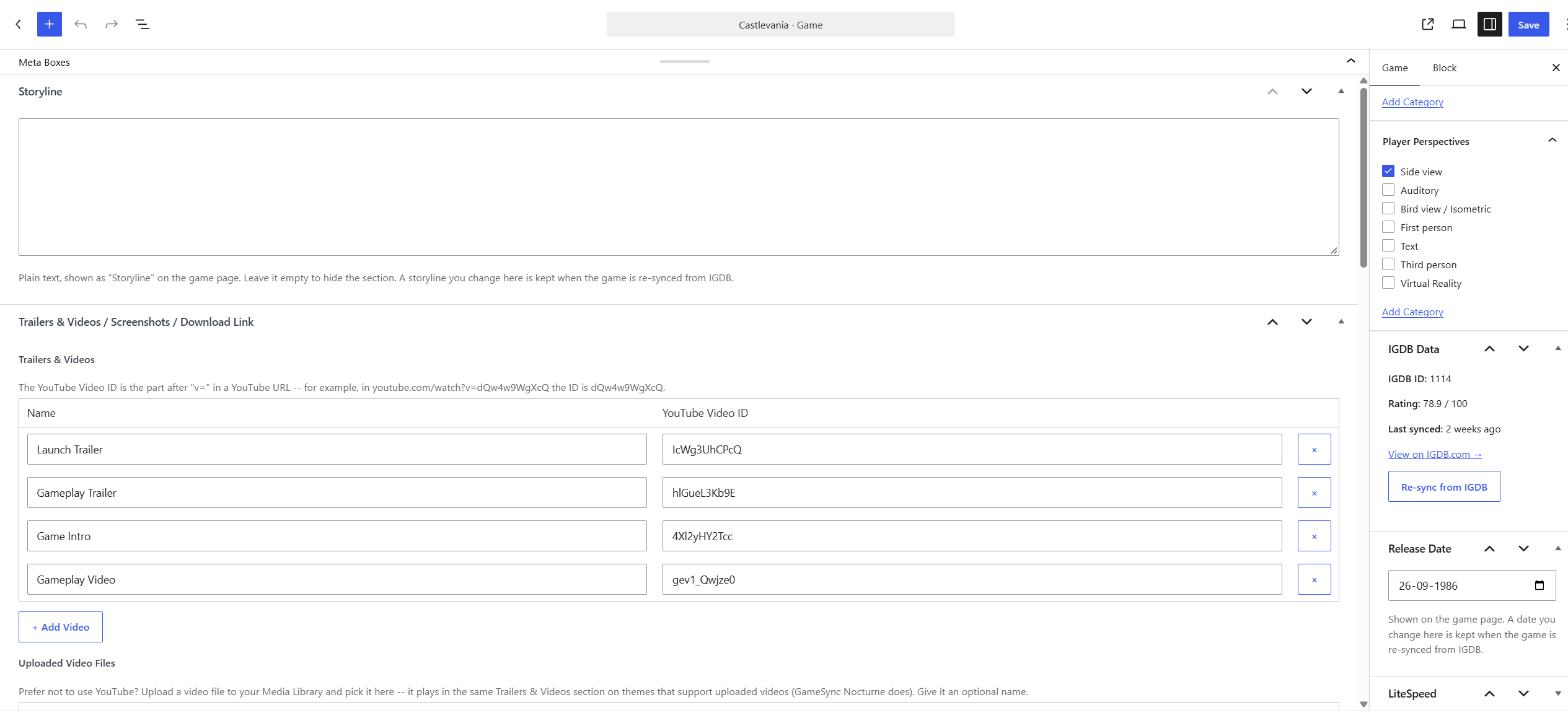
- Game Editor — hand-edit trailers/videos, screenshots and a download link directly on the Game edit screen, instead of only what the last import/re-sync happened to pull in.
- Import by List — paste game names, IGDB IDs, IGDB links or Steam store links, check what each line matched, and import up to 200 games in one run.
- Choose fields to re-sync — see what would change for a game (what it has now next to what IGDB has) and update only the fields you tick.
- Release calendar filters — filter the release list by platform or genre or a number of days, and show “In 5 days” and “Just released” badges.
- Themes & Add-ons — a screen listing the free GameSync PixelWire, Deals, Presswire, Ludexa, Arcade and Nocturne themes and the GameSync Game Ratings, Related Games and Review Breakdown plugins, with links to download each one from gamesyncwp.com and a button to activate it once it is installed.
Everything above is included and free, with no license key, no time limit and no usage limit.
Getting your IGDB / Twitch API credentials
IGDB’s API is provided through Twitch, so you’ll need a free Twitch developer app:
- Log in at dev.twitch.tv/console/apps with a Twitch account.
- Click Register Your Application, give it any unique name, set the OAuth Redirect URL to
https://localhost(required by the form, not actually used), and pick a Category such as “Application Integration”. - Open the app, copy the Client ID, then click New Secret to generate and copy the Client Secret.
- Paste both into Game Data Importer -> Settings in your WordPress admin (or define
GGDI_CLIENT_ID/GGDI_CLIENT_SECRETas constants inwp-config.phpif you’d rather keep credentials out of the database).
Notes and limits
- IGDB enforces a rate limit of roughly 4 requests/second per API key; the plugin throttles its own requests and batches bulk imports to stay well within it.
- Bulk Import runs are capped at 500 games per run — run it again with different filters to keep going.
- Access tokens are cached and refreshed automatically.
- Deleting the plugin (Plugins -> Delete, not a plain Deactivate) removes its own saved settings, Scheduled Imports tasks/run log, and cached data, but never touches already-imported Game posts, their images, or the taxonomy terms attached to them.
This plugin is an independent, unofficial integration and is not affiliated with, endorsed by, or sponsored by IGDB or Twitch Interactive, Inc.
External services
This plugin connects to two third-party services, both required for its core “import game data” functionality — it will not contact either one until you enter your own API credentials and use a feature that needs them (searching, importing, or re-syncing a game; Demo Content never makes a real API call):
- IGDB’s game database API. When you search for a game, import one, or click Re-sync, the plugin sends your search term or the game’s IGDB ID to IGDB’s API and receives back the game data (name, description, ratings, platforms, genres, cover art and screenshot URLs, etc.) shown in this description. No data about your site, your visitors, or your other content is ever sent — only the search term or IGDB ID you’re actively looking up. See IGDB’s Content Policy and the Twitch Developer Services Agreement (IGDB’s API is provided through Twitch/dev.twitch.tv, so a Twitch developer account governs access to it).
- Twitch’s OAuth token service (id.twitch.tv). Your Client ID and Client Secret (entered under Game Data Importer -> Settings, or defined as constants in wp-config.php) are sent to Twitch to obtain and refresh the access token IGDB’s API requires. See the Twitch Developer Services Agreement linked above.
Screenshots


Blocks
This plugin provides 4 blocks.
- Release calendar Lists upcoming or recent game releases by release date, optionally grouped by month.
- Game grid A grid or ranked list of imported games with cover art, title, year and rating. Filter by platform or genre and choose the order. Use Rating with the List layout for a Top rated list.
- Store links Buttons that link to where a game can be bought or downloaded (Steam, GOG, Epic Games Store, itch.io, App Store, Google Play and more), taken from the game's saved links.
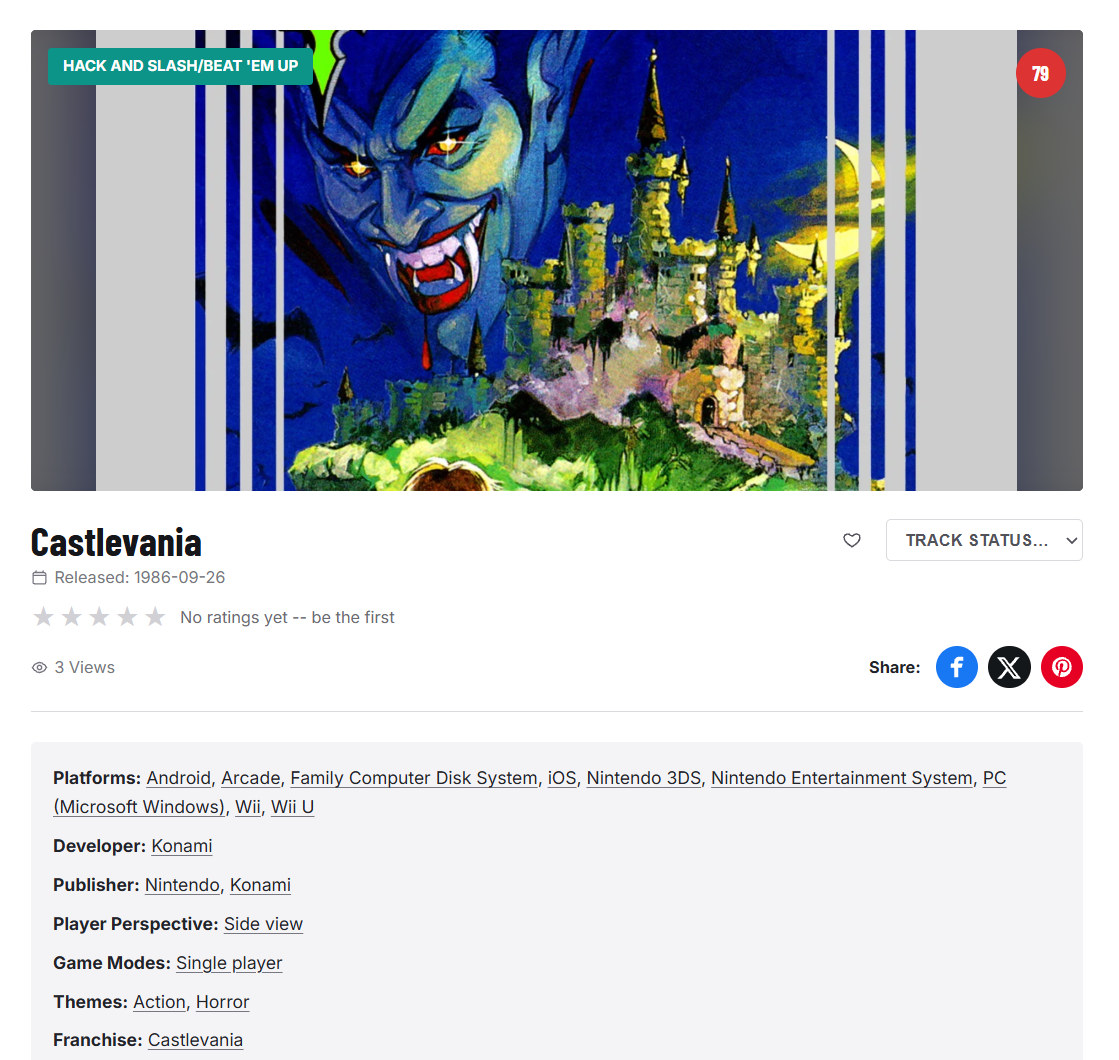
- Game card Shows one imported game: cover art, release date, rating, platforms, genres, description and screenshots.
Installation
- In WordPress, go to Plugins -> Add New -> Upload Plugin, choose the
gamesync-game-data-importer.zipfile, click Install Now, then Activate. - Go to Game Data Importer -> Settings and enter your IGDB/Twitch API Client ID and Client Secret (see “Getting your IGDB / Twitch API credentials” above), choose whether imported games default to Draft or Publish, and whether to download images into the Media Library or just link to IGDB’s CDN.
- Click Save Changes, then Test IGDB connection to confirm everything works.
- Go to Game Data Importer -> Search & Import to import your first game, or Game Data Importer -> Demo Content to preview the plugin with placeholder data first.
FAQ
-
Do I need to pay to use this plugin?
-
No. Every feature is free and fully functional, with no license key and no time, usage or feature limit.
-
They are all free, and they are separate downloads from gamesyncwp.com. Open Game Data Importer -> Themes & Add-ons for the list and the download link for each one, install it with Appearance -> Themes -> Add New -> Upload Theme (or Plugins -> Add New -> Upload Plugin), then come back to that screen to activate it. Installing a theme doesn’t automatically make it your active one.
-
Do I need a Twitch account?
-
Yes — IGDB’s API is provided through Twitch. Registering a Twitch developer app to get a Client ID and Secret is free and takes a couple of minutes; see the Description tab above for the exact steps.
-
Will re-importing a game create a duplicate?
-
No. Re-importing or re-syncing a game you’ve already imported updates the existing post (matched by IGDB’s internal game ID) instead of creating a second one. If you’ve hand-edited a game’s title, description or excerpt in WordPress since the last import, re-syncing leaves that field as you wrote it.
-
Can I customize the game page layout?
-
Yes. Copy
templates/single-ggdi_game.phpfrom the plugin into your active theme and edit it — WordPress automatically uses your theme’s copy instead of the plugin’s default. With a block (Site Editor) theme, the theme’s own single template draws the page and the plugin adds the game details after the content; edit that template under Appearance -> Editor -> Templates. -
Does the plugin add structured data for search engines?
-
Yes. Single game pages print schema.org
VideoGamedata in the page head, using only what the game actually has. Turn it off withadd_filter( 'ggdi_output_schema', '__return_false' );or adjust it with theggdi_schema_datafilter. -
Is there a WP-CLI command?
-
Yes.
wp ggdi import <id|name|igdb-link|steam-link>...imports games,wp ggdi bulk --platform=... --min-rating=... --limit=...imports by filter (add--dry-runto preview),wp ggdi resync --allrefreshes games already imported, andwp ggdi scheduled runruns any scheduled imports that are due.wp help ggdilists every option. -
Can I translate the plugin?
-
Yes. The plugin is translation-ready, and volunteers can translate it at translate.wordpress.org — translations are picked up automatically once they are complete.
-
What happens to imported games if I deactivate or delete the plugin?
-
Deactivating changes nothing. Deleting the plugin (Plugins -> Delete, not a plain Deactivate) removes its own saved settings, Scheduled Imports tasks/run log, and cached data, but never touches already-imported Game posts, their images, or the taxonomy terms attached to them — remove those manually via Game Data Importer -> All Games if you want a clean slate.
Reviews
There are no reviews for this plugin.
Contributors & Developers
“GameSync Game Data Importer” is open source software. The following people have contributed to this plugin.
Contributors
Translate “GameSync Game Data Importer” into your language.
Interested in development?
Browse the code, check out the SVN repository, or subscribe to the development log by RSS.
Changelog
2.2.0
- New: Store links block and
[ggdi_store_links]shortcode — buttons for Steam, GOG, Epic Games Store, itch.io, App Store, Google Play and more, taken from the game’s saved links, plus the download link. - New: block patterns under Patterns -> Games: Top 10 games, Recently added, Game library, Upcoming releases and Game of the month.
- New: schema.org VideoGame structured data on game pages (filters
ggdi_output_schemaandggdi_schema_data). - New: a Site Health test for the IGDB connection, and a Game Data Importer section in Site Health’s Info tab.
- Fixed: on block themes the empty “Written by … in …” line under the title of a game page is hidden.
- Fixed: the message shown when no credentials are set now points to Game Data Importer -> Settings.
2.1.0
- New: a setup guide that walks you through the Twitch credentials, tests the connection and imports a first game. It opens from the welcome notice and from the Settings screen.
- New: WP-CLI commands —
wp ggdi import,bulk,resync,status,testandscheduled list|run. - New: the Game grid block and
[ggdi_games]shortcode have a List layout with optional numbering, for “Top rated” and “Recently added” lists. - Fixed: single game pages now work on block (Site Editor) themes such as Twenty Twenty-Five — they use the theme’s own header, footer and layout instead of the plugin’s classic template.
2.0.4
- Changed: code clean-up for the WordPress.org Plugin Check: translator notes for the plural texts, a prepared query when cleaning up expired sessions, the CSV export builds its text in memory, and temporary files are removed with the WordPress function.
- Changed: the WordPress.org download no longer contains a hidden .htaccess file.
2.0.3
- Changed: the WordPress.org version no longer carries the theme and add-on zip files. The Themes & Add-ons screen now links to the free downloads on gamesyncwp.com and activates them once installed. The download from gamesyncwp.com still installs them in one click.
2.0.2
- Fixed: the plugin’s “Visit plugin site” link now opens the Game Data Importer page on gamesyncwp.com.
- Refreshed bundles: Game Ratings 1.7.7, Related Games 1.13.4, PixelWire 2.13.5, Presswire 1.10.11, Ludexa 1.10.3 (their site links now point at the right pages).
2.0.1
- Changed: the “your theme isn’t showing imported games” notice now points to the free GameSync PixelWire theme on the Themes & Add-ons screen instead of a theme search.
2.0.0
- Changed: every feature is now free and in this one plugin — Bulk Import, Scheduled Imports, the Game Editor, Import by List, Choose fields to re-sync, Release calendar filters and the Themes & Add-ons installer. There is no license key and nothing to activate.
- Removed: the Freemius account, opt-in and license screens, and all upgrade prompts.
- Changed: the bundled themes and companion plugins are refreshed (PixelWire 2.13.4, Presswire 1.10.10, Ludexa 1.10.2, Nocturne 1.2.6, Arcade 1.1.4, Deals 1.4.4, Game Ratings 1.7.6, Review Breakdown 2.1.0 with every feature included).
1.22.3
- No changes to the free plugin’s features — this release refreshes the bundled GameSync Nocturne theme (1.2.5): the All Games rating filter and sort now also work for games rated with GameSync Review Breakdown.
1.22.2
- No changes to the free plugin’s features — this release refreshes the bundled GameSync Nocturne (1.2.4), Ludexa (1.10.1) and Presswire (1.10.9) themes, which now show the Review Breakdown box with Review Breakdown 2.0.7 and newer.
1.22.1
- No changes to the free plugin’s features — this release fixes small issues on the Import by List and Choose fields to re-sync screens.
1.22.0
- New: Game card, Game grid and Release calendar blocks for the block editor, with matching
[ggdi_games]and[ggdi_releases]shortcodes (the existing[ggdi_game]shortcode is unchanged). - New: Import Log (Game Data Importer -> Import Log). Imports and re-syncs are logged with the reason for any failure, and failed imports can be retried one by one or all at once.
- Changed: bulk, scheduled and bulk-action runs now also write their failures to the Import Log.
1.21 and earlier
- Earlier releases were published as separate free and paid editions. Everything from both is now in this one plugin (see 2.0.0).